Codex Usage Dashboard: Official Views, History & Token Analytics
For current Codex usage, open chatgpt.com/settings/usage. In our signed-in Plus check on October 1, 2026, its Overview tab showed the remaining 5-hour and weekly limits, reset times, credits, and usage resets, while Analytics added recent usage history, historical limit consumption, tool activity, chats, and messages. For instant CLI usage without opening a browser, run /status in any terminal session, or run our free local dashboard (codex-usage --web) for an auto-refreshing monitor. For deep historical analytics—including 7-day and 30-day usage charts, token history, reasoning effort breakdowns, and top-consuming chats—OpenAI provides built-in Usage & billing tools in the ChatGPT Desktop app for eligible Enterprise workspaces using credit-based billing. If you need a broad explanation of quota limits or 5-hour rolling resets rather than dashboard analytics, see our overview of Codex usage.
Codex Usage Views at a Glance
Which one to reach for, depending on whether you want your current allowance, your history, or a diagnosis:
| Tool / View | Best For | Eligible Plans | Historical Depth | Key Data Shown |
|---|---|---|---|---|
| ChatGPT Web Settings | Current limits, resets, credits & recent history | ChatGPT plans with Codex access | Overview + recent Analytics history | 5h/weekly remaining, reset times, credits, limit history, tool activity, chats, messages |
| Codex & Work Analytics | Codex-focused historical breakdowns | Signed-in ChatGPT accounts with access | 7D / 1M / custom views where available | Quota balances, usage by surface, turns by model, plugin calls, skills used |
Codex CLI /status | Instant quota check while coding | All CLI users | Current active windows | 5-hour % remaining, weekly % remaining, reset times |
| Local Codex Dashboard | Always-on local session monitoring | All users (Free & Open Source) | Session only (in-memory) | Auto-refresh (60s), 5h/weekly quotas, session deltas |
| Desktop Usage & Billing | Historical trends & chat attribution | Eligible Enterprise workspaces using credit-based billing (Desktop v26.812.10818+) | 7D & 30D history | Token history (cached/uncached/output), Surface/Model/Reasoning/Speed groupings, Top consuming chats |
| Personal Analytics Plugin | Conversational workflow queries | Eligible Enterprise & Edu workspaces (Admin-enabled) | Conversational analysis (trailing 30-day workspace summary window) | Natural-language queries (@personal-analytics), usage analysis, plugin mix |
Current Allowance Dashboards & Real-Time Views
Three surfaces report your active allowance: the official account view, an in-terminal snapshot, and continuous monitoring on localhost.
Shows your current 5-hour and weekly limits, reset times, credits, usage resets, and recent usage. The Analytics tab adds historical limit consumption, tool activity, chats, and messages.
Open SettingsOutputs your remaining 5-hour and weekly percentages and exact reset times directly inside your active terminal session. See our Codex CLI usage guide for command syntax and output details.
Reads your already-authenticated Codex client to show 5-hour and weekly remaining percentages and reset times in your terminal or a local browser tab that auto-refreshes every 60 seconds.
Install (~30s) →If you are on an individual ChatGPT Plus or Pro subscription, the current web Usage page can show more than a live meter. In our signed-in Plus check on October 1, 2026, its Analytics tab exposed recent usage history, historical 5-hour and weekly limit consumption, tool activity, chats, and messages. Richer Desktop Usage & billing token drilldowns and Personal Analytics remain workspace-specific features. To track usage limits and reset dates for your subscription tier, see our guide to Codex usage limits by plan and when Codex usage resets. For a foundational explanation of how quota consumption works across all tiers, read our general guide to Codex usage.
Local Browser Dashboard (Free & Always Visible)
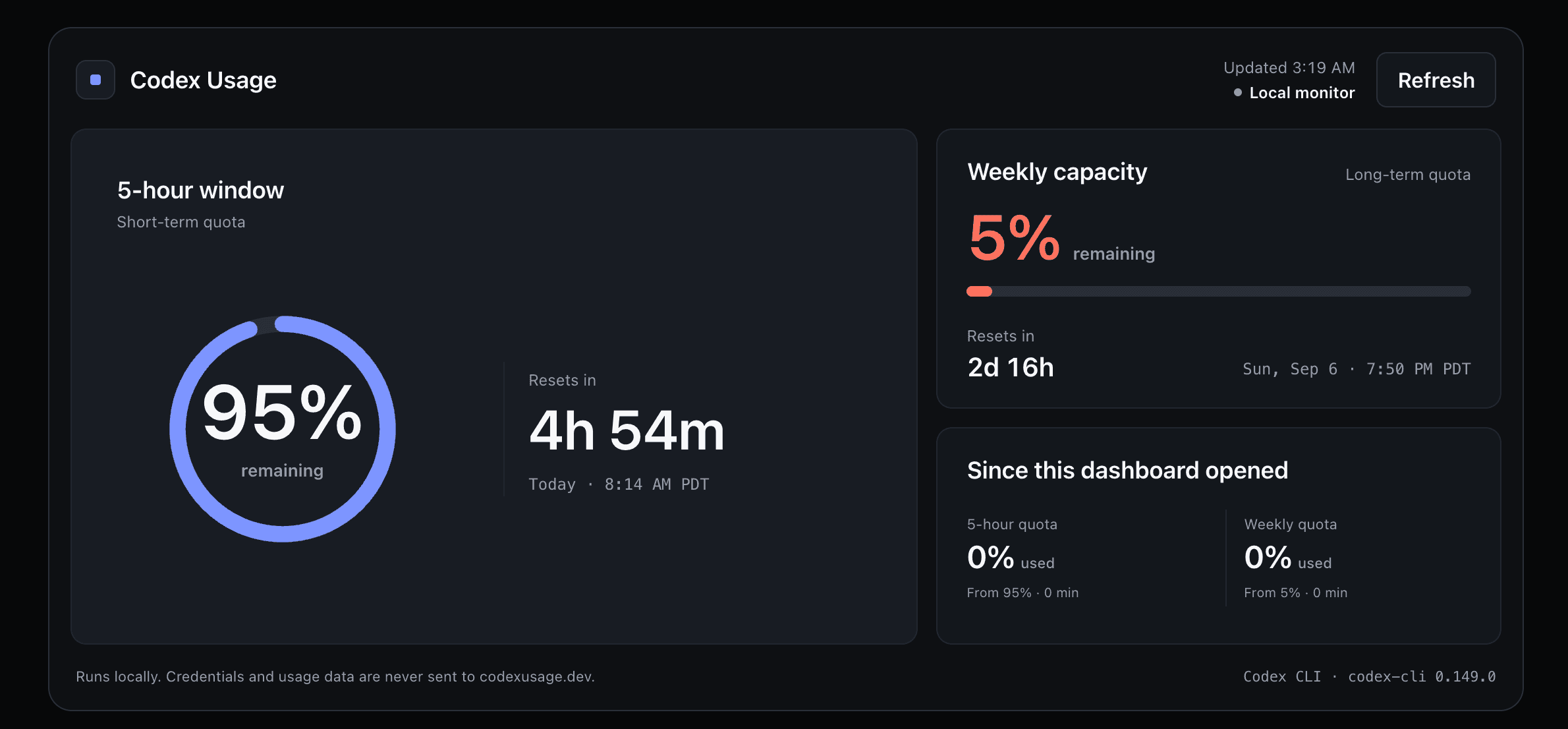
Running codex-usage --web opens a lightweight localhost view that auto-refreshes every 60 seconds. It displays your current 5-hour and weekly quota windows, reset countdowns, and session-only usage since opening — kept entirely in local memory with no persistent external logging.
Codex Usage History & Analytics in ChatGPT Desktop
Yes, you can see historical Codex usage if your organization uses an eligible Enterprise workspace with credit-based billing in the ChatGPT Desktop app (version 26.812.10818 or later). Under the account menu (bottom left) > Settings > Usage & billing, OpenAI provides rich historical metrics across Work and Codex. To compare which usage metrics are measurable across personal subscriptions, member desktop views, and administrator consoles, see our complete guide to Codex analytics and data granularity.
Review visual credit consumption trends across 7-day and 30-day timeframes. The dashboard displays your monthly Work and Codex usage against general workspace usage limits, credits consumed, remaining allowance, and next reset dates.
Filter and group historical credit usage by Surface, Model, Reasoning, or Speed to inspect how consumption breaks down across execution environments and configurations (see what the recommended model and Power presets mean in practice).
Inspect itemized token consumption over time, cleanly separated into uncached input tokens, cached input tokens, and output tokens to understand caching efficiency and token density.
Review usage driven by extensions: plugin activity counts calls by plugin, while skill activity counts invocations by skill.
ChatGPT Desktop highlights your highest-consuming locally available Work and Codex chats, displaying per-chat lifetime credit usage.
Where enabled by workspace administrators under Admin Console > Usage limits > Workspace > Usage visibility and requests, members can view dollar-denominated spend estimates alongside raw credit figures for their usage.
Do not confuse ChatGPT Desktop Usage & billing with the developer API dashboard at platform.openai.com/usage. ChatGPT Desktop tracks your subscription allowance and workspace credit pool. In contrast, the Platform usage page tracks pay-as-you-go developer API keys (OPENAI_API_KEY) billed per token on your developer credit balance, which operates completely independently of ChatGPT subscription quotas.
What is Personal Analytics and Who Can Use It?
Personal Analytics is an optional ChatGPT Desktop plugin potentially available to eligible Enterprise and Edu workspaces that allows members to query their own usage patterns and workspace trends using natural language.
Eligibility & Workspace Prerequisites
Personal Analytics is not available on Plus or Pro plans, and it is not available to every Enterprise or Edu workspace. It requires administrative enablement and desktop support:
- Admin Enablement: A workspace owner or administrator must enable the plugin under Workspace settings > Plugins > Personal Analytics.
- Desktop Client: Members must use ChatGPT Desktop version 26.812.10818 or later and install the plugin from the desktop sidebar.
- Workspace Summaries: Where enabled, workspace summaries use a fixed trailing 30-day window rather than an arbitrary custom date range.
What Personal Analytics Is Useful For
Rather than navigating static charts, users can mention @personal-analytics directly inside any Work or Codex chat to ask analytical questions in plain English:
Four levels of usage tracking
Use Web Settings, CLI /status, or the local dashboard to see immediate percentage remaining and reset countdowns.
Use Desktop Settings > Usage & billing to review 7D and 30D consumption graphs and itemized token breakdowns over time.
Use Top Consuming Chats and grouping dimensions (Surface, Model, Reasoning, Speed) to inspect which chats and settings drove usage.
Use the Personal Analytics plugin to prompt @personal-analytics for qualitative workflow insights and workspace benchmarks.
Why Doesn't My Chat Usage Add Up to My Total?
Your individual chat usage numbers do not necessarily add up to your overall total under Usage & billing because chat-level stats are estimates for the main conversation stream rather than an exhaustive billing ledger.
OpenAI explicitly documents that a Work or Codex chat's displayed usage in the chat header or locally available top-consuming list is not a complete record of every billable action. When reconciling your total monthly or 30-day credit spend, keep these documented factors in mind:
Work delegated to sub-agents, multi-step subroutines, or separate execution tasks runs outside the primary conversation thread. While these tasks consume credits or draw from your plan's shared allowance, their consumption does not roll up into that individual chat thread's visible tally.
Image generation and certain separately billed tool activity carry specialized billing weight or credit consumption that counts toward workspace usage limits without appearing fully itemized inside the simple text-token display of the individual chat. See how image generation appears in Codex usage and credit reports.
Background automated or system-generated activity can consume credits or quota without generating visible turns in the chat window, counting toward your workspace total while showing no individual chat attribution.
Per-chat UI counters update roughly once per minute, but aggregate dashboards, historical charts, and background reporting reconcile on different intervals. Reporting delays or incomplete data can cause temporary discrepancies between active chats and aggregate totals.
Standard conversational ChatGPT text threads and regular voice conversations operate under completely separate message caps and do not draw from Work, Codex, or workspace credit pools. Learn more about boundary rules in our guide to what counts toward Codex usage across Work, Excel, and Agents.
If your allowance is dropping much faster than your workload suggests, use our abnormal Codex usage drain diagnostic guide to separate normal high consumption from current platform and accounting issue reports.
OpenAI Help Center Article #20001478: “Reviewing Work and Codex usage and using Personal Analytics in ChatGPT Desktop”
Codex Usage Dashboard & Analytics FAQ
Common questions about checking Codex usage, tracking token history, and reading the analytics:
Where is the Codex usage dashboard?
For current Codex usage, open chatgpt.com/settings/usage. Its Overview tab shows your 5-hour and weekly limits, reset times, credits, and usage resets; the Analytics tab adds recent usage history, limit consumption, tool activity, chats, and messages. OpenAI also still serves a separate Codex and Work Analytics page at chatgpt.com/codex/cloud/settings/analytics.
Which dashboard view should I use to check Codex usage?
For current limits, credits, reset times, and recent history, use chatgpt.com/settings/usage. For persistent, auto-refreshing allowance tracking while coding, use the free local browser dashboard (codex-usage --web). The separate Codex and Work Analytics page at chatgpt.com/codex/cloud/settings/analytics adds Codex-focused breakdowns. Eligible Enterprise workspaces also have richer Desktop Usage & billing views.
Can I see Codex usage history?
Yes. In our signed-in Plus check on October 1, 2026, chatgpt.com/settings/usage included an Analytics tab with recent usage history, historical 5-hour and weekly limit consumption, tool activity, chats, and messages. Eligible Enterprise workspaces also have richer Desktop Usage & billing views with additional token and workspace analytics.
Can I see usage by model, reasoning, speed, or surface?
Yes, eligible workspace members with credit-based billing can group usage by Surface, Model, Reasoning, or Speed inside Settings > Usage & billing in ChatGPT Desktop. This multi-dimensional grouping reveals how credit consumption breaks down across these documented dimensions.
How do I find my highest-usage Codex chats?
You can find your highest-usage Codex chats in the ChatGPT Desktop app under Settings > Usage & billing by scrolling to the Top Consuming Chats section. This displays a ranked list of locally available Work and Codex chats along with their per-chat lifetime credit consumption.
Why doesn't my chat usage add up to my total?
Your individual chat usage numbers do not necessarily add up to your overall total because chat-level stats are estimates for the main conversation stream rather than an exhaustive ledger. Work delegated to sub-agents and separate tasks, image generation and certain separately billed tool activity, background automated or system-generated activity, and reporting delays or incomplete data can consume credits or quota without appearing fully in the individual chat display.
What is Personal Analytics and who can use it?
Personal Analytics is an optional ChatGPT Desktop plugin potentially available to eligible Enterprise and Edu workspaces that allows members to query their own usage patterns and workspace trends using natural language. It is not available on Plus or Pro plans, is not enabled by default in every workspace, and requires workspace administrator enablement before members can install it.
How does the official dashboard compare to /status and the local dashboard?
The official web Usage page shows current 5-hour and weekly limits, reset times, credits, and recent analytics; the CLI /status command gives an immediate quota snapshot inside Codex; and the local Codex Usage dashboard provides an always-visible, auto-refreshing monitor in your terminal or local browser.
Next Steps & Related Guides
Compare baseline 5-hour rolling windows and weekly quota allowances across Plus, Pro, Business, Astra, and Spark.
Learn how rolling 5-hour windows, weekly subscription cycles, and global resets restore quota to 100%.
Understand how flexible credits, instant weekly resets, and workspace allowances expand capacity beyond standard limits.
Full breakdown of how ChatGPT Work, Excel, Workspace Agents, and Voice interact with your shared allowance.